


I previously wrote an article on how to set the default theme via a script:
https://supportishere.com/how-to-set-theme-in-windows-7-via-script-for-all-users/
This article is displaying a method to simply set the Default Background image for new users in Windows 7.
This method performs the following actions:
1. Takes Ownership of “C:\Windows\Web\Wallpaper\Windows\img0.jpg”.
start /w "TakeOwn Of img0" "C:\Windows\System32\takeown.exe" /A /F "C:\Windows\Web\Wallpaper\Windows\img0.jpg"
2. Grant Full Permissions to img0.jpg file to Administrator.
start /w "Take Permissions" "C:\Windows\System32\Icacls.exe" "C:\Windows\Web\Wallpaper\Windows\img0.jpg" /grant Administrator:F /Q
3. Replaces the file with your desired Background Image.
xcopy "%~dp0img0.jpg" "C:\Windows\Web\Wallpaper\Windows\" /heyi
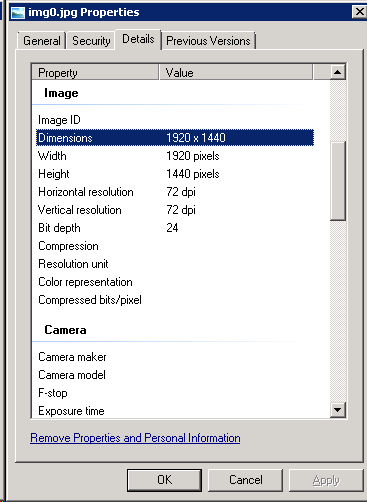
Note: Image should have the following attributes:
Dimensions: 1920 X 1440
Resolution: 72 DPI
Bit Depth: 24
Example of Script Package:
https://dl.dropbox.com/s/jnaqawa536ab9md/Win7SetDefaultWallpaper.zip?dl=1
Thanks for the article. I had been missing the ownership step which had me puzzled!