

In many Organizations, the AD support team is separated from the team in charge of Imaging. The AD team naturally is protective with their setup and fight any GPO setting that would result in more responsibility to their staff. So that leaves us in some occasions having to turn to Local Group Policy to apply the settings we want. I’ve recently come across some great tools provided by Microsoft (very quietly) for Government usage. These tools allow you to basically back up your LGPO settings to a txt file and apply them on demand with a script silently.
MS link: http://blogs.technet.com/cfs-file.ashx/__key/communityserver-components-postattachments/00-03-05-16-48/LGPO_2D00_Utilities.zip
BackUp link: https://panaconsulting.egnyte.com/h-s/20120118/077e07ba18c74413
How to use:
- Apply desired settings on a Windows 7 test machine, using the gpedit.msc MMC snap-in.
- Run the “ImportRegPol.exe” with the /parseonly and /log to pull settings and save to a specified LOG file.
User settings and machine settings need to be captured separately:
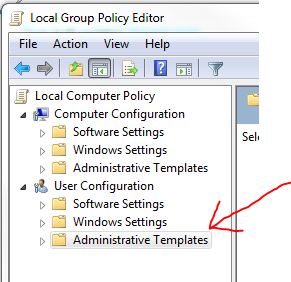
Capture User Example
ImportRegPol.exe /u C:\Windows\System32\GroupPolicy\User\registry.pol /parseonly /log <PathToSettingsFile>.log
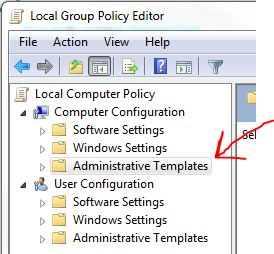
Capture Machine Settings Example:
ImportRegPol.exe /m C:\Windows\System32\GroupPolicy\Machine\registry.pol /parseonly /log <PathToSettingsFile>.log - Use the Apply_LGPO_Delta.exe utility to apply the settings silently. On restart the settings will take effect.
Apply_LGPO_Delta.exe <PathToSettingsFile>.log /log <PathToLogFile>.log - This can easily be added to an SCCM or MDT Task Sequence and tied to logic to ensure the correct settings get pushed to the appropriate target systems/users.
Command Line help for LGPO Tools:
Apply_LGPO_Delta.exe inputfile0 [inputfile1 …] [/log LogFile] [/error ErrorLogFile] [/boot]
inputfileN One or more input files specifying the changes to make. Input files must be security template files, or registry-based policy files using a custom file format described below. Apply_LGPO_Delta automatically determines whether a file is a custom policy file or a security template. Security templates can be created using the “Security Templates” MMC snap-in.
/log LogFile Writes detailed results to a log file. If this option is not specified, output is not logged nor displayed.
/error ErrorLogFile Writes error information to a log file. If this option is not specified, error information is displayed in a message box dialog.
/boot Reboots the computer when done.
ImportRegPol.exe –m|-u path\registry.pol [/parseOnly] [/log LogFile] [/error ErrorLogFile] [/boot]
-m path\registry.pol [for Computer configuration] or
-u path\registry.pol [for User configuration]
Path\registry.pol specifies the absolute or relative path to the input registry policy file (which does not need to be named “registry.pol”).
/parseOnly Reads and validates the input file but does not make changes to local group policy. In conjunction with the /log option, can be used to convert a registry policy file to an input file for Apply_LGPO_Delta.
/log LogFile Writes detailed results to a log file. If this option is not specified, output is not logged nor displayed. The logged results for the registry policy settings can be used as input for Apply_LGPO_Delta.
/error ErrorLogFile Writes error information to a log file. If this option is not specified, error information is displayed in a message box dialog.
/boot Reboots the computer when done.
-Brian G
Thanks for your nice tutorial.
It saves me a lot of time.
Very nice!
Is there a way to apply theese changes at once?
Are you refering to the Machine and User settings? If so, I would look at creating a GPOPack with MS’s SCM (http://technet.microsoft.com/en-us/library/cc677002.aspx) and apply it easily with MDT2012 Sp1, look at Johan’s blog for detailed instructions on this:
http://www.deploymentresearch.com/Blog/tabid/62/EntryId/47/Creating-and-Applying-Custom-GPO-Packs-using-MDT-2012-Beta-2-with-or-without-SCCM-2007-2012.aspx
These are truly great ideas in on the topic of blogging.
You have touched some fastidious factors here. Any way keep up wrinting.
Does your site have a contact page? I’m having trouble locating it but, I’d like to send you
an email. I’ve got some ideas for your blog you might be interested in hearing. Either way, great site and I look forward to seeing it expand over time.
Good point, I’ll get that fixed. Here is my contact email brianfgonzalez@gmail.com.
I believe whaqt you wrote was actually very logical.
However, think about this, suppose you typed a catchier post title?
I aam nnot saying your content is not solid., however suppoose you added
a headline that graabbed folk’s attention? I mean Howw to apply Local
Grojp Policy setrings silently using the ImportRegPol.exe and Apply_LGPO_Delta.exe utilities.
| Support is >Here< is kinda boring. You might glance at Yahoo's front page and watch how they write article headlines to get viewers interested. You might add a related video or a picture or two to grab people interested about what you've written. In my opinion, it would bring your posts a little bit more interesting.
Marta,
Thanks for the tips!
I’m going to research yahoo like you asked. I think most of their posts are titled with a question, which is smarter.
Thanks again for your honest feedback.
/BG
Is there any way to apply these backed-up settings to a single user (i.e. a User-specific local Group Policy) using these tools or perhaps another way?
Sure, the tricky part there is pulling the user’s SID in the OS. I’ve done this before with PS. Take a look at this script as a reference for this.
https://github.com/brianfgonzalez/Scripts/blob/master/Z-CopyLGPO-Content.ps1
/Brian G
Can you give a simplified way to do this? I’m not very proficient in PS and it doesn’t even tell me what to do to accomplish this.
Im looking for the same info..
Want to apply backed up settings to a specific user using these tools.
The powershell script is only about getting the users sid.
But i cant find anything about applying a gpo log using the delta tool to a specific user.
I did find another way that involves the LocalGPO Tool:
https://gallery.technet.microsoft.com/LocalGPOmsi-Excellent-MS-2593b2eb
But this method is way cleaner imo and easier to modify by hand if you dont want to create a whole new backup of a lgpo.
Nils,
Great link, I’ve used the LocalGPO tool before to back up a config and apply via an MDT Task Sequence, but I didn’t remember it grabbing user specific GPOs. If it does, I have to agree with your conclusion that it may be cleaner to support down the road.
I’ll give it a test and write up what I find.
/Brian G
Ah sorry i meant the method using the delta tool would be cleaner 🙂
LocalGPO works as i said but its not possible to capture a specific user GPO as far as i know but only systemwide user config. not a complete deal breaker but being able to grab a specific user config would be better imo, because i could keep preconfigured user on my test system and if i update something just grab it and i dont have to reconfigure the whole gpo again.
You cann in the end apply the backup to a specific user.
So if you can find a way to apply a importregpol “capture” using the apply_lgpo_delta tool to a single user i would love to hear it 🙂
And btw, great blog with a lot of useful information!
does this work on 2008r2 servers?
Herb,
I don’t see why not.
/Brian G
Hi Brian,
Hope you canhelp.
I am trying to setup Local Group Policy on a user computer to mark DSCP for outgoing traffic destined for an IP Address/32 server running WebRTC.
I’m not able to see the markings on Wireshark capture.
(WebRTC do not have an .exe running, but running the html code obtained from that server.)
Sinn
Hi Brian,
I require some advice to setup DSCP for WebRTC outgoing traffic on a user computer, possibly through LocalGPO.
Could you help.
Sinna,
Any setting that is available in the LGPO mmc should be available to set via the lgpo.exe: https://www.microsoft.com/en-us/download/details.aspx?id=55319
This tool also lets you specify settings only to the non-administrators group.
/BG